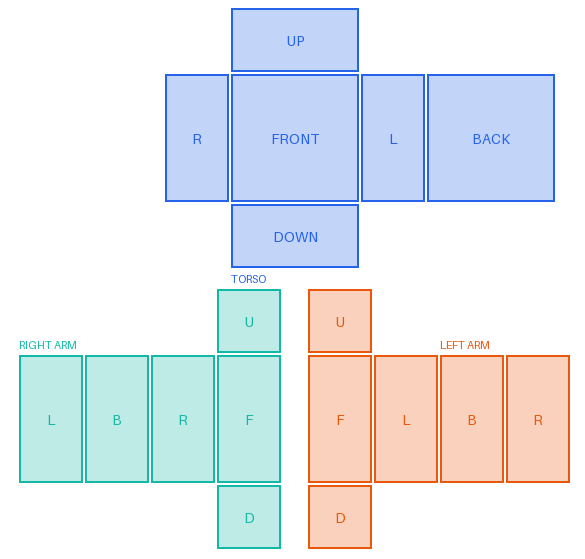
How the Roblox shirt template is laid out
The Roblox shirt template is a 585 × 559 canvas with 18 panels in three groups. The torso takes the top half. The two arms share the bottom half: the right arm on the left and the left arm on the right. Sides are always named from the avatar's point of view, as if you were wearing the shirt, which is why the halves look swapped when you face the image.
Every panel is a flat face of a block. Roblox folds the torso panels into a box and each arm's panels into a long box, and paints your pixels onto those faces. Pixels between and around the panels are never used.
Torso panels
The torso strip runs R → FRONT → L → BACK from left to right. Read it as walking around the avatar: its right side, its chest, its left side, then its back. The back's right edge wraps around to meet the R panel again. UP sits above FRONT (the top of the shoulders and neck area) and DOWN below it (the underside of the torso, hidden by the legs most of the time).
| Panel | X | Y | Width × height |
|---|---|---|---|
| UP | 231 | 8 | 128 × 64 |
| R (right side) | 165 | 74 | 64 × 128 |
| FRONT | 231 | 74 | 128 × 128 |
| L (left side) | 361 | 74 | 64 × 128 |
| BACK | 427 | 74 | 128 × 128 |
| DOWN | 231 | 204 | 128 × 64 |
X and Y are the top-left corner of the panel in pixels, measured from the top-left of the 585 × 559 image.
Right arm panels (left half of the image)
The right arm's long faces run L → B → R → F. Its L face is the inner side that touches the torso, R is the outer side, B is the back of the arm and F the front. U is the top of the shoulder and D is the end of the arm.
| Panel | X | Y | Width × height |
|---|---|---|---|
| U (top) | 217 | 289 | 64 × 64 |
| L (inner side) | 19 | 355 | 64 × 128 |
| B (back) | 85 | 355 | 64 × 128 |
| R (outer side) | 151 | 355 | 64 × 128 |
| F (front) | 217 | 355 | 64 × 128 |
| D (bottom) | 217 | 485 | 64 × 64 |
Left arm panels (right half of the image)
The left arm's long faces run F → L → B → R. Here L is the outer side and R is the inner side that touches the torso.
| Panel | X | Y | Width × height |
|---|---|---|---|
| U (top) | 308 | 289 | 64 × 64 |
| F (front) | 308 | 355 | 64 × 128 |
| L (outer side) | 374 | 355 | 64 × 128 |
| B (back) | 440 | 355 | 64 × 128 |
| R (inner side) | 506 | 355 | 64 × 128 |
| D (bottom) | 308 | 485 | 64 × 64 |
The pants template uses the same layout
The Roblox pants template is also 585 × 559 with the same 18 panel positions. The torso panels are the same, and the arm panels become the legs: right leg on the left half, left leg on the right half. U is the top of the leg and D is the sole of the foot. On the torso, a shirt is drawn over the pants, so pants torso panels show only where the shirt torso is transparent.
Reading the layout without mistakes
- Long arm panels are 64 wide, not 128. A chest logo that is 128 pixels wide will not fit on a sleeve.
- Sleeve length is the top part of the arm panels. For short sleeves, paint the top of L, B, R and F (and U) and leave the rest transparent so the body color shows.
- The F panels sit next to the center. The right arm's F and the left arm's F are the two panels closest to the middle of the image, right under the torso.
- Line up neighbours. FRONT's left edge joins R and its right edge joins L; on each arm the four long panels join in the order listed above, and the last one wraps around to the first.
You do not have to place any of this by hand. In the Roblox shirt template maker you can pick a panel by name, drop a picture on it, and check the front and back on the preview avatar. When the file is ready, follow the Roblox shirt upload guide.